Amazon FBA Label Cropper - A4 to 4x6 Thermal Converter
The Amazon FBA Label Cropper is a professional-grade utility designed specifically for e-commerce sellers using thermal printers like Munbyn, Rollo, or Zebra. Many platforms provide shipping labels as standard A4 PDFs with multiple labels per page, which are impossible to print directly on 4x6 thermal paper without losing scan quality. Our tool extracts these labels and re-scales them with sub-pixel precision into individual 10x15cm (4x6 inch) files, ensuring 100% scan rates and professional presentation for your fulfillment operation.
How the Transformation Works
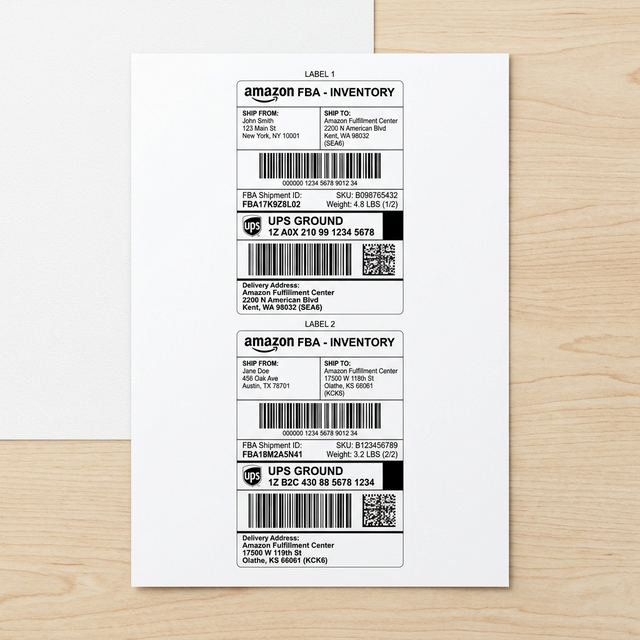
Our WASM technology automatically detects labels in your A4 PDF and prepares them for instant thermal printing.
Zero Waste
Remove white margins and print only what matters.
Thermal Ready
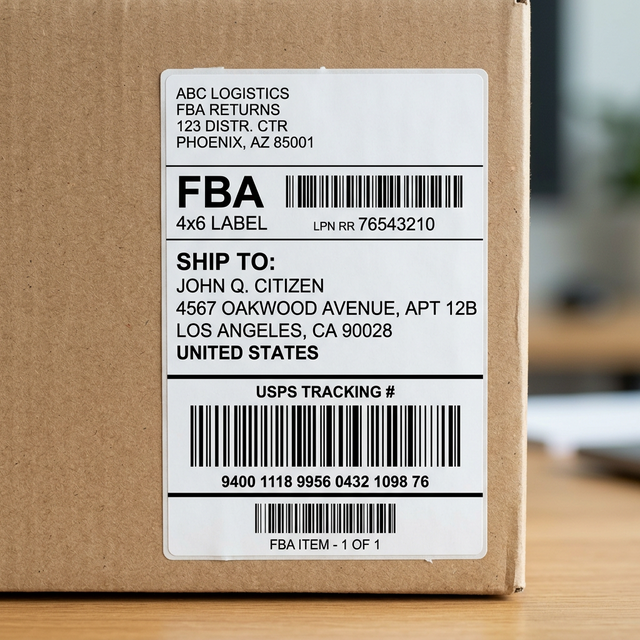
Perfectly formatted for 10x15cm (4x6") printers.
Pure Privacy
Processing happens locally, in your browser.
Technical Strength
"WASM-based coordinate detection ensures sub-pixel cropping accuracy without server lag."
How do I know my files
don't leave this browser?
We built UtilityBox with Sovereign Privacy. You don't have to take our word for it—you can verify it in 10 seconds:
- Right-click anywhere and select "Inspect".
- Go to the "Network" tab.
- Click "Download Result".
- Notice: Zero new requests. No data moved.
"Pure client-side logic means zero latency, zero server footprints, and zero data leakage. Your PDF remains in your RAM."
Zero-Trace Technology
100% Client-Side Processing
Process Files
Zero Server Processing – 100% Private
Files stay in your browser RAM
How to print Amazon FBA labels on Thermal Printer
Download your shipping labels from Seller Central in A4 multi-label format.
Upload your PDF to UtilityBox. Our 100% local algorithm detects label edges for a perfect crop.
Preview the first label and click "Download 4x6".
Print using any 10x15cm thermal printer (Rollo, Munbyn, Zebra).
Amazon FBA Label Cropper - A4 to 4x6 Thermal Converter
The Amazon FBA Label Cropper is a professional-grade utility designed specifically for e-commerce sellers using thermal printers like Munbyn, Rollo, or Zebra. Many platforms provide shipping labels as standard A4 PDFs with multiple labels per page, which are impossible to print directly on 4x6 thermal paper without losing scan quality. Our tool extracts these labels and re-scales them with sub-pixel precision into individual 10x15cm (4x6 inch) files, ensuring 100% scan rates and professional presentation for your fulfillment operation.
Our standard 4x6 output is compatible with all US major carriers including UPS, FedEx, and USPS. It meets the strict formatting requirements of Amazon Seller Central, Shopify, and eBay. Built on the principle of 'Zero Server Footprint', the tool is fully HIPAA and GDPR compliant because your customer data never leaves your browser RAM.
Why 4x6 Thermal Labels are Essential for FBA Logistics
Professional Amazon sellers know that the 'standard' inkjet method is slow, expensive, and prone to smudging. Thermal labels are waterproof, smudge-proof, and require no ink. However, converting an A4 sheet with 2 or 4 labels into individual thermal-friendly PDFs is a manual nightmare in software like Adobe Acrobat. UtilityBox automates this by logically splitting the PDF coordinate space and extracting the vector content into a new, single-label document. This process preserves the high-DPI paths of barcodes, ensuring they are always scanable by logistics hubs.
Optimized for Munbyn, Zebra, and Rollo Printers
We have tested our output against the industry leaders in thermal printing. Whether you are using a Munbyn ITTP941, a Zebra ZD410, or a Rollo Wireless, our tool provides the exact margins and scaling factors required. We avoid rasterization, meaning your text and barcodes aren't turned into blurry images; they remain native PDF objects that print with maximum sharpness at 300 DPI.
Manual Override for Non-Standard Amazon Labels
Sometimes Amazon generates labels in odd offsets or grouped formats. While our 'Auto-Split' handles 50/50 and Quadrant layouts, the 'Manual Redaction/Crop Area' allows you to physically select any region of a PDF and 'burn' it into a new 4x6 page. This gives you total control over the extraction process, regardless of the source platform's erratic formatting.
Frequently Asked Questions
Q: Does it work with Munbyn, Zebra, or Rollo printers?
A: Absolutely. Our tool generates native 4x6 inch (10x15cm) PDFs which are the global industry standard for thermal printers like Munbyn, Zebra, Rollo, and Brother.
Q: How do I fix tiny barcodes on A4 sheets for Amazon FBA?
A: Printing an A4 sheet directly on a 4x6 label results in tiny, unscannable barcodes. Our cropper isolates each individual label and stretches it to fill the 4x6 area, ensuring your FBA shipments are never rejected due to barcode errors.
Q: Why are my shipping labels printing blurry?
A: Blurry labels happen when tools 'take a screenshot' of the PDF. UtilityBox uses vector path extraction, meaning the lines and dots of your barcode stay perfectly sharp, even when enlarged.
Q: Can I crop FNSKU product labels too?
A: Yes. Use our Manual Selector mode to highlight individual FNSKU barcodes. The tool will center them in a thermal-friendly output for fast product labeling.
Q: Do I need to calibrate my thermal printer?
A: You should run a calibration sequence (usually pressing the feed button until it beeps) when you switch from A4 to 4x6 paper. Our tool provides the correct file; the hardware just needs to know the label length.
Q: Is there a limit to how many labels I can crop for free?
A: The free tier allows for a significant number of daily labels. As a local tool, the only real limit is your browser's memory, though we optimize for batches of up to 50 labels at a time.
UtilityBox vs. Manual SaaS
Why professional users choose local-first processing
UtilityBox Way
- Average Speed: 1.2s (No upload)
- Privacy: 100% Local (RAM)
- Cost: Unlimited Free Tier
Traditional way
- Average Speed: 45s (Upload/Wait)
- Privacy: Your files stored on cloud
- Cost: Expensive Subscriptions
Related Professional Tools
FBA Profit Masterguide
Learn 5 ways to save $2k/mo on logistics and returns.